SleepBar - Mac Sleep Timer
A simple and elegant sleep timer for macOS. Schedule your Mac to sleep automatically.
7-day free trial • macOS 14.0+
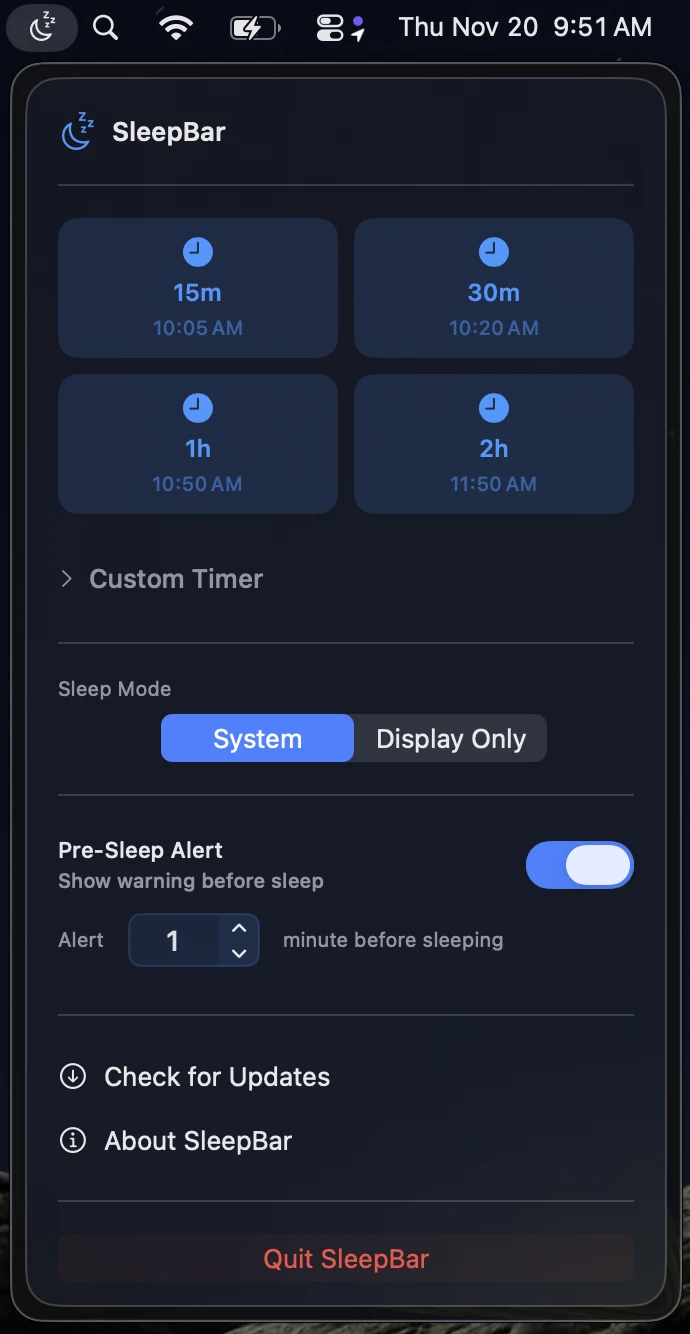
Mac Sleep Timer Features
Quick Sleep Timers
Preset timer options for 15, 30, 60, and 120 minutes. Set your Mac sleep timer with one click.
Custom Duration Timer
Set a custom sleep timer for any duration you need with hours and minutes precision. Perfect for podcasts and music.
Schedule Specific Time
Schedule your Mac to sleep at a specific time. Perfect for overnight downloads and long-running tasks.
Flexible Sleep Modes
Choose between putting your entire macOS system to sleep or just the display. Save energy your way.
Pre-Sleep Warning Notification
Get notified 1 minute before sleep with options to cancel or extend the timer. Never lose unsaved work.
Beautiful Native Design
Follows Apple's liquid glass design principles for a modern, native macOS feel. Built for macOS Sonoma and later.
What's New
Download SleepBar for Mac
Try the best Mac sleep timer app free for 7 days. No credit card required.
Requires macOS 14.0 (Sonoma) or later
Simple One-Time Pricing
One-time purchase
- ✓ 7-day free trial
- ✓ Lifetime updates
- ✓ All features included
- ✓ Use on 3 Macs
Frequently Asked Questions
What is SleepBar?
SleepBar is a Mac sleep timer app that allows you to schedule your macOS computer to sleep automatically after a set duration or at a specific time. It's perfect for listening to music before bed, managing overnight downloads, or saving energy.
Does SleepBar work on my Mac?
SleepBar requires macOS 14.0 (Sonoma) or later. It works on all modern Macs including MacBook Air, MacBook Pro, iMac, Mac Mini, Mac Studio, and Mac Pro running compatible versions of macOS.
Is there a free trial?
Yes! SleepBar offers a 7-day free trial with full access to all features. No credit card is required to start your trial. Simply download and start using the app.
What's the difference between system sleep and display sleep?
System sleep puts your entire Mac into a low-power state, closing all apps and stopping all processes. Display sleep only turns off your screen while keeping your Mac running, perfect for downloads or background tasks.
Can I use SleepBar on multiple Macs?
Yes! Your $4.20 one-time purchase license allows you to use SleepBar on up to 3 Macs. The license includes lifetime updates at no additional cost.
How do I cancel a sleep timer once it's set?
Simply click the SleepBar icon in your menu bar and you'll see options to cancel or modify your active timer. You'll also receive a notification before sleep with the option to cancel.